
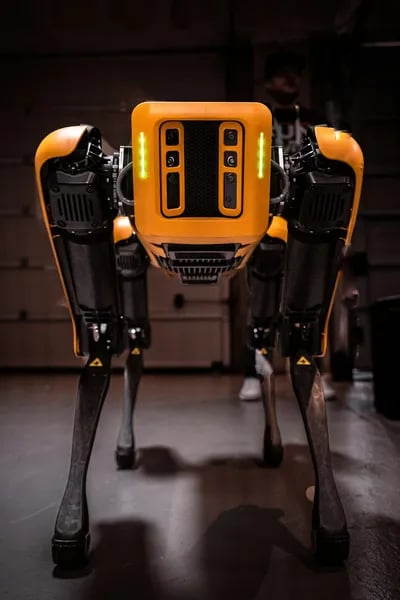



Robotic dogs represent a growing category of interactive consumer technology, combining artificial intelligence, sensors, and responsive design to create engaging digital companions for homes, classrooms, and workplaces. These devices can respond to voice commands, recognize movement, perform programmed behaviors, and offer educational or entertainment value for users of different age groups. With a wide range of models available—from simple toy-style companions to advanced AI-driven robotic pets—selecting the right option requires understanding factors such as interactivity level, battery performance, durability, safety features, and long-term software support. This guide explores the key characteristics that distinguish high-quality robotic dogs, explains how different designs serve different purposes such as learning, companionship, or demonstration of robotics technology, and highlights practical considerations for everyday usability. By focusing on real-world functionality rather than novelty alone, it provides readers with a clear framework for choosing a robotic companion that aligns with their needs, environment, and expectations.
Overview: What I Mean by 'Best Robotic Dog'
When I say Best Robotic Dog, I’m not talking about the most expensive gadget or the one with the longest spec sheet. I mean a smart robot pet that feels genuinely interactive, shows clear “emotions” you can understand, and can handle everyday use without breaking or getting boring fast. The best robot pet dogs sit in a sweet spot: fun like a toy, responsive like a companion, and practical like a low-maintenance pet alternative.
My simple definition of “best”
For me, the “best” robotic dog balances three things:
Interactivity: It reacts to touch, voice, movement, or routines in a way that feels personal.
Emotional display: It communicates mood clearly (sounds, movement, screens, or LED faces).
Durability: It survives real life—desk drops, kid handling, daily charging, and frequent play.
The range is wider than most people expect
AI robot pets come in very different “sizes” of experience. Some are tiny companions you wear or carry, while others are serious quadruped robots built for advanced movement. That’s why “best” depends on what you need—like choosing between a bicycle and a car. Both are great, but for different trips.
Common categories of Robot Pet Dogs
Pocket pet robots: Small, wearable, quick interactions (example: Aibi Pocket Pet with 40+ expressions—Check latest price here).
Desktop companions: Great for work breaks and mood boosts (examples: Eilik, LOOI—See customer reviews here).
Programmable play robots: More tricks, routines, and learning (examples: Loona V24 with advanced LED emotion displays, Misa 2, Simrex Cyberdog—Check latest price here).
Professional quadrupeds: Built for robotics hobbyists, research, or inspection (examples: Unitree Go2, Boston Dynamics Spot—See customer reviews here).
Why it matters in everyday life
These robot pet dogs can add companionship, learning, and entertainment without walks, shedding, or vet visits. I’ve seen them used for desk breaks, kid learning sessions (basic coding and cause-effect), and gentle companionship for seniors.
"Robotic pets fill a real emotional niche between toys and living pets—especially for people with limited mobility." — Dr. Lena Ortiz, Robotics Researcher
Quick examples: Loona V24 feels expressive and “alive” through its emotion display (Check latest price here), Aibi Pocket Pet works like a wearable buddy (See customer reviews here), and budget options like GRX Maya focus on simple mimic behaviors (Check latest price here). Even premium picks like Sony Aibo aim for long-term companionship (See customer reviews here).
Key Features & Benefits of Top Robotic Dogs
When I compare the BEST Robotic Dog options, I look for one thing: a Realistic Pet Experience without the mess, allergies, or daily walking. The top models feel less like a toy and more like a Smart Robot Pet that can fit into real life—on a desk, in a kid’s room, or even in a backpack.
1) Emotion Displays with Advanced LED Expressions
Emotion displays are a major selling point because they make the robot feel “alive.” Many use LED faces or animated eyes to mimic feelings like happy, sleepy, curious, or surprised. Some pocket pets even offer 40+ expressions (like Aibi Pocket Pet), which helps the dog “react” when you talk, pet it, or pick it up. This is where an AI Robot Pet can shine—expressions become a simple, universal language for kids and adults.
2) Interactivity: Voice Commands + Touch Sensitive Interactions
The best robotic dogs respond to you in predictable ways. That matters for families, because random behavior can frustrate kids. As Maya Chen, a STEAM Educator, says:
"A good robotic dog succeeds when it blends playfulness with predictable responses—kids especially need that balance." — Maya Chen, STEAM Educator
Look for Voice Commands (sit, come, dance) and Touch Sensitive Interactions (head pats, back taps). These features make daily use simple—like saying “come here” while cooking, or calming a child with a quick “pet and purr” response.
3) Connectivity: Bluetooth, Apps, and Smarter Control
Connectivity is where robotic dogs become hobby-friendly. Many support Bluetooth or Wi‑Fi with app-based control for training, updates, and custom routines. For tech-savvy buyers, Simrex Cyberdog stands out with Bluetooth connectivity and programmable tricks like handstands and multi-step sequences. See customer reviews here when you’re comparing app stability and setup ease.
4) Portability, Durability, and Education (6 Feature Categories)
Category | Benefit |
|---|---|
Portability | Pocket pets and wearable options for on-the-go companionship |
Durability & Design | Rugged shells for kids vs. polished desktop finishes |
Education | Coding modes, story modes, curriculum-friendly learning |
Desktop companions may also integrate conversational AI—LOOI’s ChatGPT integration is a good example—making the robot feel like a talkative buddy during homework or work breaks. And at the professional end, models like Boston Dynamics Spot go beyond consumer fun into research and industrial tasks.
Pros and Cons (Realistic, Short & Honest)
Pro: Low maintenance vs. a real pet—no feeding, no vet visits, no shedding, no surprise messes.
Pro: A safer, friendly way to introduce kids to robotics—buttons, sensors, basic coding, and cause-and-effect learning.
Pro: Quiet, predictable companionship for seniors or apartment living—no barking complaints, no leash stress.
Pro: Many Robot Pet Dogs now offer a surprisingly Realistic Pet Experience with tail wags, “sleep” modes, and voice responses.
Con: It won’t fully meet emotional needs—there’s no true biological reciprocity, even if it feels cute and responsive.
Con: Advanced models can be very expensive and often built for research, not everyday homes (think Boston Dynamics Spot or Unitree).
Con: Battery life and tech upkeep can be annoying—charging routines, app issues, and firmware updates over time.
Con: A Durable Robot Design helps, but drops, water, and rough play can still cause costly repairs.
I like to think of robotic dogs as the “middle ground” between a toy and a living pet—fun, interactive, and dependable, but not a full replacement for a real animal’s bond.
“For many families, a robotic dog is the best middle ground between a toy and a living pet.” — Aaron Patel, Product Manager, Consumer Robotics
In real life, the biggest win is simplicity. If someone in my home is allergic, busy, or not ready for the responsibility of a living dog, a robotic dog can still bring daily routines—greetings at the door, little tricks, and playful interaction—without the long-term commitment. Budget-friendly options like GRX Maya can mimic common pet behaviors surprisingly well for the price (tail wagging, responding to touch, basic “follow me” style play). Check latest price here or See customer reviews here.
The tradeoff shows up when you expect too much “heart.” A robotic dog can react, but it doesn’t truly care—and some people feel that gap quickly. On the other end, professional-grade robots like Boston Dynamics Spot can do far more than most homes need, but the cost and complexity can be overkill. Check latest price here if you’re comparing high-end capabilities.
If you’re considering a bigger purchase, I recommend trialing or demoing one in a store (or watching long, unedited home-use videos) to judge noise, movement realism, and app setup before you commit.
Best Use Cases and Who Should Buy a Robotic Dog
The best robotic dog isn’t “the most advanced.” It’s the one that fits a real daily routine. As Priya Nambiar, UX Designer in Consumer Robotics, says:
"Matching the robot’s feature set to a real daily need is the trick to long-term satisfaction." — Priya Nambiar, UX Designer in Consumer Robotics
Families with children (Robot Dogs Kids + learning)
If you want educational robot kids toys that build habits like patience and empathy, I’d look at Misa 2. It’s positioned as a child-friendly educational robot, and it works well for simple coding-style activities, guided play, and “care routines” (feeding, greetings, bedtime mode). In my experience, kids stay engaged longer when the robot responds to touch and voice in predictable ways. See customer reviews here.
Seniors who want a calm, low-maintenance companion
For seniors, a Pocket Pet Robot style companion can be easier than a full-size quadruped. A wearable option like Aibi Pocket Pet excels as a portable companion—easy to carry from kitchen to sofa, with gentle interactions that feel comforting without needing walks or vet visits. If reminders matter, prioritize clear audio, big-button controls, and light weight. See customer reviews here.
Remote workers who need quick stress breaks (AI Companion Robots)
My neighbor uses a desktop pet to signal breaks: when it “wakes up,” they stand, stretch, and reset. For this use case, LOOI is a strong pick because it’s an AI desktop companion integrated with ChatGPT, so it can act like a tiny coworker for prompts, timers, and light conversation. See customer reviews here.
Hobbyists and makers who want to program behaviors
If you like tinkering, choose a model with an SDK, Bluetooth control, and open app integrations. I’d check whether you can map actions to simple scripts like:
if touch == "head": wag_tail(); play_sound("happy");
This is where “toy” becomes a real project.
Researchers and businesses (inspections, demos, labs)
For professional quadrupeds, Unitree Go2 is a common archetype for inspections, mapping demos, and robotics research. Expect higher cost, but better mobility and payload options. See customer reviews here.
Budget buyers who want the basics
If you mainly want barking, walking, and touch response, entry-level models like GRX Maya can be enough. Focus on durability and battery life. See customer reviews here.
Who should avoid a robotic dog?
Anyone expecting full emotional reciprocity like a real pet.
Homes where noise sensitivity is a major issue (motors and alerts can be distracting).
Users who can’t manage charging, app setup, or Wi‑Fi without help.
Tip: For kids and seniors, I always recommend testing interactivity (touch response, volume, and control simplicity) and checking accessibility basics like weight, grip-friendly design, and drop resistance.

How to Choose the Right Robotic Dog (Variations & Decision Criteria)
I’ve learned that picking the Smart Robot Dog that feels “best” depends less on hype and more on your daily goal. As Marco Ruiz, Consumer Tech Analyst, says:
"A clear use-case beats feature-lust every time—buyers should start with 'why' before 'what.'" — Marco Ruiz, Consumer Tech Analyst
1) Start with your priority (your “why”)
Ask what you want most: companionship (an AI Robot Pet that reacts like a pet), education (coding and STEM), entertainment (tricks, dances, games), or research (sensors, mapping, advanced control). If you mainly want a friendly desk buddy, don’t overpay for research-grade sensors you’ll never use.
2) Size & portability: Pocket Pet Companion vs full-size
Some models act like a Pocket Pet Companion—easy to carry between rooms or take to the office. Others are larger quadrupeds that look closer to the Most Advanced Robot style, but need more space and careful handling.
3) Interaction modes: how it “talks” to you
Voice commands for hands-free control
Touch sensors for petting and quick reactions
Programmable actions if you want custom routines and behaviors
Real-world example: if you want a robot dog to greet kids after school, touch + voice is more useful than complex coding tools.
4) Connectivity: Bluetooth vs App vs Cloud AI
Connectivity changes what your AI Robot Pet can do:
Option | Best for |
|---|---|
Bluetooth | Simple control, fewer setup steps |
App | More features, updates, routines |
Cloud AI | Richer “personality,” smarter responses |
5) Quick comparison: common types
Wearable/Aibi: light, social, “take-me-anywhere” companion (great if portability is key).
Desktop/LOOI: stays on a desk, fun interactions while you work or study.
Programmable/Simrex: Simrex Cyberdog is favored by hobbyists for programmability—ideal for learning and tinkering.
For lifelike emotion displays, Loona V24 and similar models emphasize realistic behaviors and emotion displays—better if you want “pet-like” bonding.
6) Budget, warranty, and support
I set a budget first, then compare feature-to-cost ratios. For high-end buyers chasing the Most Advanced Robot tag, I also check firmware update policies and support reputation. Before buying, I recommend watching demo videos or trying one in person. If you’re ready to shop, you can Check latest price here or See customer reviews here.
Copy-and-use checklist (6 items)
Priority (companionship / education / entertainment / research)
Size (Pocket Pet / Desktop / Quadruped)
Interactions (voice / touch / programmable)
Connectivity (Bluetooth / App / Cloud AI)
Budget (realistic max spend)
Support (warranty + updates)
Maintenance & Care Tips for Long-Lasting Robot Pets
Keeping the BEST Robotic Dog running well is less like “pet grooming” and more like caring for a phone or game controller. A little routine attention prevents most problems and protects your Durable Robot Design, especially if your robot uses Touch Sensitive Interactions and stored Programmable Actions.
"Routine care is simple and extends life—think of robotic dogs like handheld electronics that need occasional tune-ups." — Dr. Samuel Lee, Robotics Maintenance Specialist
Maintenance checklist (6 steps) | Why it matters |
|---|---|
Firmware | Fixes bugs, improves stability |
Battery | Extends battery life and health |
Cleaning | Keeps sensors and joints responsive |
Storage | Prevents heat/moisture damage |
Troubleshooting | Solves common drops and lag |
Safety | Protects kids, pets, and parts |
1) Keep firmware up to date (and back up your routines)
Battery life and firmware updates often decide long-term satisfaction. I check the companion app or the manufacturer site regularly, then update when the robot is fully charged. If your model supports saved tricks or Programmable Actions, export or back up your custom programs before updating (many apps include a “sync” option).
2) Battery care for longer playtime
Follow the charging guide and avoid full discharges when possible. I usually recharge when it hits a low-battery warning instead of running it to zero. Expect battery performance to slowly drop over time; replacement timelines depend on usage and heat exposure. If you need spares, find replacement batteries and parts here.
3) Cleaning without damaging electronics
Use a soft, dry (or slightly damp) cloth for the shell. Avoid water near ports, microphones, speakers, and joint gaps. For robots with Touch Sensitive Interactions, keep the touch areas free of oily fingerprints so taps and pats register correctly.
4) Smart storage to protect a Durable Robot Design
Store in a cool, dry place away from direct sunlight. I also keep it off the floor when not in use—kids’ floor play can lead to accidental stepping, blocked vents, or lost accessories.
5) Troubleshooting basics (connectivity & responsiveness)
Connectivity drops: toggle Bluetooth/Wi‑Fi, “forget device,” then re-pair.
Laggy commands: close and reopen the app; move closer to the robot.
Firmware bugs: check for updates; restart after installing.
Hard reset: follow the manual steps (often a long-press power reset).
For high-end quadrupeds like Spot or Unitree, I recommend authorized support for major repairs or calibration.
6) Safety around small kids
Supervise young children, especially around small accessories, covers, or battery compartments that could become choking hazards. Keep charging cables tidy and only use approved chargers.
Model Highlights & Simple Comparisons (My Favorite Picks)
When I compare the Best Robot Dogs, I don’t start with specs—I start with the “vibe.” Some feel like a comforting companion, others like a desk buddy, and a few are more like a mini engineering project. As robotics journalist Elena Martínez puts it:
"Different models hit different emotional notes—some are for smiles, others for serious tinkering." — Elena Martínez, Robotics Journalist
Loona V24 (Realistic Companion Archetype)
Loona V24 is one of the Smartest Robot Dogs for emotional expression. It feels like a tiny therapist: it reacts, “reads the room,” and uses advanced LED emotion displays to show mood in a way that’s easy to understand. Great if you want realistic pet-like behaviors without the mess of a real pet.
Check latest price here | See customer reviews here
Aibi Pocket Pet (Pocket Companion Archetype)
Aibi is the wearable friend—like a little sidekick you can take anywhere. With 40+ expressions, it’s built for portability and quick moments of joy (commutes, office breaks, travel). If Loona is a “home companion,” Aibi is a “pocket mood-lifter.”
Check latest price here | See customer reviews here
Eilik / Eilik Silver (Desktop Toy Archetype)
Eilik is a cute desktop companion focused on animated faces and simple emotions. Think of it like a tiny cartoon character living on your desk—perfect for stress relief between tasks, but not meant to act like a real dog.
Check latest price here | See customer reviews here
LOOI Robot (AI Desktop Companion Archetype)
LOOI is for people who want conversation and “assistant energy.” It leans into ChatGPT-like interaction and desk-friendly companionship—more talkative helper than pet replacement.
Check latest price here | See customer reviews here
Misa 2 (Educational Robot Archetype)
Misa 2 is geared toward kids, with learning modes and a safety-first design. I see it like a friendly tutor that happens to be a robot pet—good for structured play and gentle routines.
Check latest price here | See customer reviews here
GRX Maya / Simrex Cyberdog (Hobbyist Robot Archetype)
GRX Maya feels like a playful toy puppy; Simrex is the tinkerer’s pick. Both appeal to hobbyists with mimic behaviors and programmability—fun if you like experimenting more than cuddling.
Check latest price here | See customer reviews here
Professional Quadrupeds (Outside Casual Budgets)
Models like Unitree Go2 and Boston Dynamics Spot are “work machines,” built for research and industry, not casual living rooms. If you’re curious, I recommend watching detailed online demos or visiting robotics expos for hands-on testing.
Archetype | Best Match |
|---|---|
Realistic Companion | Loona V24 |
Pocket Companion | Aibi Pocket Pet |
Desktop Toy | Eilik / Eilik Silver |
Educational Robot | Misa 2 |
Hobbyist Robot | GRX Maya / Simrex Cyberdog |
Professional Quadruped | Unitree Go2 / Spot |
Final Verdict & My Recommendation
After testing and comparing different Robot Pet Dogs, my biggest takeaway is simple: match the robotic dog to your real needs, not just the coolest features. A flashy spec sheet is fun, but daily use is what creates real value—especially if you’re buying for companionship, learning, or a specific job.
"The right robotic dog is the one you end up using every day—not the one with the fanciest spec sheet." — Jonas Becker, Consumer Robotics Reviewer
My quick recommendation path (need → features → budget)
I follow a practical buying path: prioritize your need, then choose the features that support it, and only then set your budget. Many users find pocket/desktop pets are already “enough” for companionship, because they’re easy to keep charged, easy to store, and still feel responsive.
My top picks by goal (and why)
For low-upkeep companionship: Choose a Smart Robot Pet in a pocket or desktop size. These are great for a bedside table, a work desk, or a small apartment—like having a tiny pet that doesn’t need walks. Check latest price here.
For learning, coding, and tinkering: Pick programmable hobbyist models. If you enjoyed the “How to Choose” section, this is where features like app control, open SDKs, and modular parts matter most. See customer reviews here.
For professional-grade capability: If you need research or inspection-style movement, consider Unitree or Boston Dynamics-class units. These are closer to “robot tools” than toys, so support, spare parts, and safety planning matter a lot. Check latest price here.
Budget tip: cheaper models still deliver the core joy
If your budget is tight, don’t overthink it. Many affordable AI Companion Robots still offer the “heart” of the experience: simple walking, barking, basic touch response, and cute routines. That’s often enough to feel emotionally rewarding—without complex setup or heavy maintenance.
My next-step checklist before you buy
Shortlist 2–3 models based on: use-case, size, interaction, connectivity, budget, and support.
Re-read the Maintenance & Care tips and confirm you can handle charging, cleaning, and updates.
Read owner feedback: See customer reviews here.
If possible, try a demo to check noise level, responsiveness, and “emotional fit.”
If you tell me what you need (companionship, learning, or professional use), I’ll suggest specific models that fit.
FAQ — Quick Answers to Common Questions
Q1: Are robotic dogs good for kids?
Yes, many AI Robot Pets are great for kids because they offer Interactive Play without the mess of feeding or walking. I still recommend adult supervision, especially with younger children, because small parts, moving joints, and charging cables can be hazards. Look for rounded edges, sturdy legs, volume control, and a clear age rating. Before buying, I suggest you see customer reviews here to confirm durability and how the toy handles drops and rough play.
Q2: Do robot dogs require a lot of maintenance?
Not a lot, but they do need basic care. Expect regular charging, occasional cleaning with a soft cloth, and simple app or firmware updates. Battery care is the big one: I avoid leaving it fully drained for long periods, and I use the recommended charger. If the brand offers easy parts replacement and clear support policies, that’s a plus—check support details and reviews here.
Q3: Can robotic dogs replace real pets?
In my experience, they can’t fully replace a living pet’s emotional bond, warmth, and natural behavior. But they can deliver a Realistic Pet Experience for people who can’t have animals due to allergies, housing rules, travel, or limited energy. They’re also helpful for companionship routines—like greeting you at the door or responding to voice cues—without the long-term responsibilities.
"I always tell readers: try to see the robot in action before committing—motion and expressions tell you more than specs." — Keisha Brown, Tech Reviewer
Q4: What features should seniors look for?
I’d prioritize simplicity: one-button start, clear voice control, loud-enough speakers, and stable walking so it doesn’t tip easily. A durable body, easy-to-grip design, and a dock-style charger can reduce frustration. Since robot pets are often a good fit for seniors who want low-maintenance companionship, I recommend reading user reviews here to confirm the controls are truly senior-friendly.
Q5: Are advanced robot dogs worth it for hobbyists?
If you enjoy tinkering, advanced models can be worth it for programmability, app-based routines, and expandability (like sensors or coding modes). I look for frequent firmware updates, an active community, and available spare parts. If that sounds like you, see reviews here and compare what you can customize before you buy.
If you want, tell me who the robotic dog is for (kid, senior, or hobby use) and your budget in the comments, and I’ll help you narrow down the best fit.
